PetDesk - Pet Health Reminders
- 4.8
- Rating
- 1.00M
- Installs
- Free
- Price

 Analysis by App-foxy
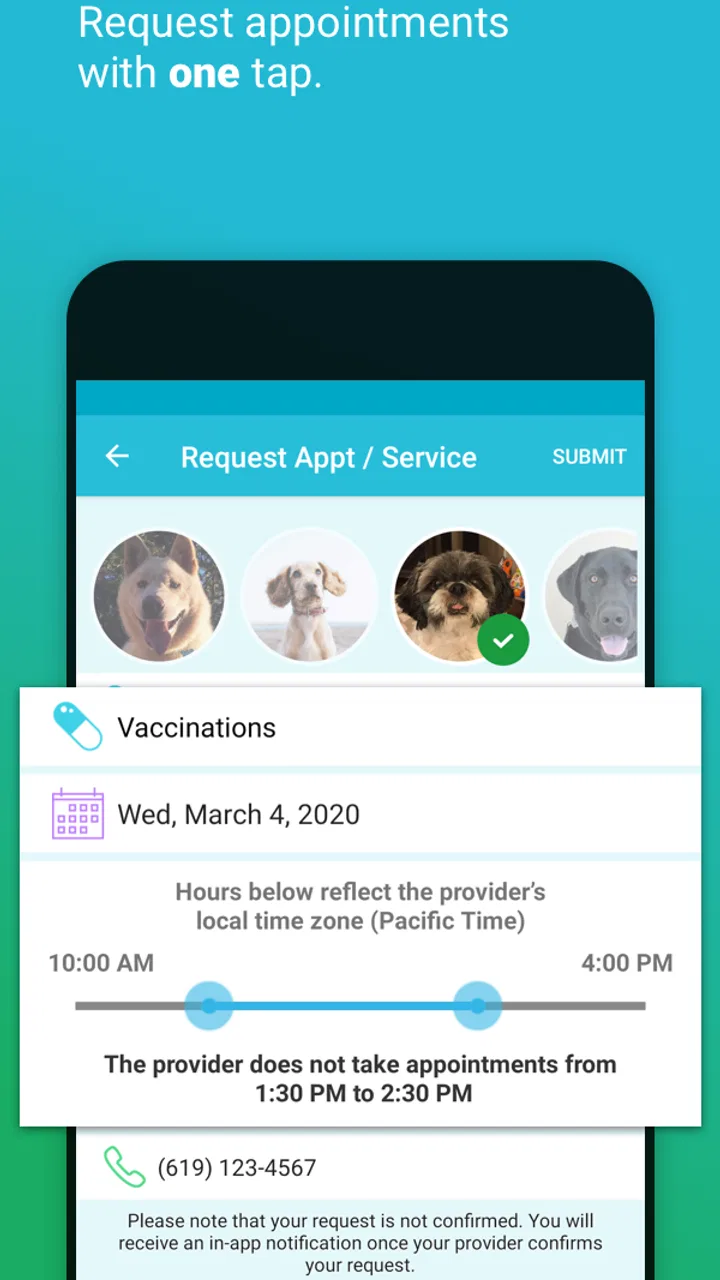
Managing a pet’s health usually means juggling appointment cards, reminder emails, vaccination records, medication instructions, and messages from a veterinary clinic. I found PetDesk most useful as a single place to bring that routine information together, rather than as another general-purpose calendar that happens to mention pets. It is a free lifestyle app from PetDesk, designed for Android and iOS users who want pet care details close at hand.
My first impression was that its value depends less on flashy extras and more on whether I am willing to keep the information current. When I enter a pet’s details carefully, the app becomes a practical reference during busy weeks and stressful visits. When I leave records incomplete or treat it as a replacement for professional veterinary advice, its usefulness drops quickly. That balance is important: this is a management tool, not a diagnostic service.
The app has been available since July 9, 2013, and its broad adoption gives it a reassuring level of familiarity. It has passed one million installs and holds a 4.8 average from around thirty-one thousand ratings, with roughly thirteen thousand written reviews. Those figures do not prove that every household will enjoy the experience, but they do suggest that the basic idea has found a substantial audience.
You May Also Like

 Blood Strike: 2.5 Anniversary
Blood Strike’s Loadouts Turn Every Drop Into a Tactical Gamble
A close look at Blood Strike’s custom loadouts: how fast access to signature weapons reshapes its battle royale rhythm, rewards preparation, and narrows the gap between fights.

 Pandora - Music & Podcasts
Pandora’s Music Is Easy to Start, but Harder to Recover
Pandora’s strength is its low-effort path from a seed to a station. Its weak spot is how much confidence it asks you to place in connection, setup, and quiet recovery.

 8 Ball Pool
 Is Built on Rivalries, Rematches, and Routine
A close look at the rivalries, rematches, shared routines, and unanswered safety questions that turn a quick pool match into a persistent mobile community.

 Samsung Music
’s Quiet Strength Is Playing What You Already Own
Its reach comes less from spectacle than from dependable access to a personal library. That simplicity is both the app’s strongest retention engine and its ceiling.

 AccuWeather: Weather Radar
AccuWeather Review: A Quick, Clear Forecast for Everyday Decisions
For everyday plans, the best forecast is the one you can understand quickly. AccuWeather makes rain timing, radar, and local conditions easy to act on, with a few trade-offs.

 Hill Climb Racing
Why Hill Climb Racing Still Turns Crashes Into One More Run
A tiny car, a bumpy hill and one more upgrade: Hill Climb Racing keeps resurfacing because its simple chaos makes every near-miss feel personal.
More From Our News Desk



How PetDesk earns trust in everyday pet care
I trust PetDesk most when I treat it as a shared reference that supports—not replaces—the conversations and records I keep with a veterinarian. In this section, I look at the small habits that make its reminders more dependable, from checking entries after a change in care to keeping only useful details current. That practical approach also helps clarify where the app’s convenience has limits.
A focused home for health routines
What I like about PetDesk is the way it frames pet care as an ongoing routine instead of a collection of isolated appointments. A vaccination is not just a date; it connects to a pet’s age, previous records, future reminders, and the questions I may want to ask at the next visit. Keeping those pieces together can be more useful than searching through a phone calendar and separate notes application.
A realistic example is a household with an older dog taking regular medication. Before leaving for work, I can check the pet’s care information, confirm what needs attention, and review upcoming veterinary tasks without opening several unrelated apps. If another family member handles the evening routine, having the same central reference can reduce the chance that an instruction is forgotten or duplicated.
I would still treat every reminder as a prompt to verify, not as medical authority. If a clinic changes a dosage, moves an appointment, or gives instructions that differ from what I entered, the clinic’s current guidance should win. The app is strongest when it helps me remember and organize; it is not the place to settle an urgent health question.
Why the developer matters to the experience
PetDesk is developed by PetDesk, and that connection is relevant because the app feels built around the relationship between pet owners and veterinary care. I found that more useful than a generic household organizer when the task involved health history, preventive care, or preparing for a clinic conversation.
At the same time, I would not choose it solely because it comes from a pet-focused developer. Trust should come from the controls I can see, the information I choose to enter, and the way I manage my account, not from branding alone. A pet-care app handles details that can feel personal, so I prefer to review its visible settings and permissions during setup rather than accepting every prompt automatically.
What the ratings tell me—and what they do not
The strong average rating is encouraging, especially alongside the large number of ratings and reviews. It indicates that many users find the app worthwhile for their routines. Still, ratings tend to reflect the whole experience, including device behavior, account setup, clinic interaction, and individual expectations. Someone looking only for a simple offline checklist may judge it differently from a user who wants a connected pet-care record.
I also noticed an important trade-off in relying on a specialized service: the experience can be more valuable when it fits the user’s veterinary workflow, but less compelling when a person wants complete freedom to design every field and reminder. That is not a flaw in itself; it is a reason to decide whether structure helps or restricts you.
Controls I would check before entering sensitive details
My preferred setup approach is cautious. I begin with the minimum information needed to understand the app, then inspect account and notification controls before adding a full health history. I look for options related to sign-in, reminders, device notifications, and account changes. This makes it easier to understand what I am agreeing to and prevents a rushed setup from becoming difficult to untangle later.
A useful rule is to add information in stages, not all at once. Start with the pet’s name and essential care dates, test the reminder behavior, and only then decide whether the app deserves a more complete record. This workflow is especially sensible for people who are privacy-conscious or who manage several pets and want to avoid correcting a large amount of information later.
I would also review notification choices individually. A reminder is helpful when it arrives at a sensible time, but too many alerts can make important messages blend into everyday phone noise. If the app allows different notification settings, I would keep high-value health prompts visible while reducing anything that feels repetitive. If a reminder concerns a medication or appointment, I would cross-check it against the latest veterinary instruction.
Account control and shared household use
Pet care is often shared, but not every household wants every person to have identical access. Before inviting another person into the routine, I would check how account access works, what can be edited, and whether removing access is straightforward. These are practical questions because a former housemate, pet sitter, or family member may no longer need to see or change the information later.
I would avoid sharing one password casually when separate access is available. Individual control is easier to manage, and it reduces confusion about who changed a reminder or updated a record. If the app’s visible account options do not match the way a household works, a shared paper folder or a carefully managed calendar may be safer and simpler for that particular family.
For a pet sitter, I would share only what is necessary for the visit. Feeding instructions, emergency contacts, and appointment timing may be useful, while a complete history may not be. This is a broader lesson I took from using the app: convenience should not automatically mean giving every helper access to every detail.
Permissions deserve a deliberate review
When installing any pet-health app, I pay attention to permission requests rather than assuming they are all essential. I grant only what matches a clear task I intend to use. For example, a notification permission may make sense for reminders, while an unrelated request would deserve closer scrutiny before approval. The important point is that I make the choice consciously at the operating-system level.
I also revisit permissions later. Phone settings can show which access remains active, and removing an unnecessary permission is a simple way to keep control. This does not require technical expertise, and it is a worthwhile habit for an app that may remain installed for years while a pet’s care history grows.
Because privacy practices can change, I would read the current privacy information and account terms directly in the app or its official store materials before entering extensive records. I do not assume that a pet app treats data exactly like a notes app, and I do not treat a high rating as evidence about data handling. The visible choices and current policy are more relevant than reputation alone.
Data-sensitive moments during real use
The most sensitive moment is often not installation; it is the gradual accumulation of information. A pet profile can become a detailed timeline containing health events, clinic references, medication notes, and household routines. I recommend periodically asking whether every stored detail is still useful. Removing outdated notes can make the record clearer and reduce unnecessary exposure if the account is ever accessed by someone else.
Another sensitive moment comes when the phone is shared or displayed in public. Notifications can reveal pet-related information on a lock screen, and a reminder may appear while someone else is looking at the device. I would check the phone’s notification preview settings and choose whether full text should appear when the screen is locked. This is a small adjustment, but it gives the owner more control over what other people can see.
Travel creates a different challenge. I might need vaccination or treatment information away from home, yet I would not assume that every feature works without a connection or that every record is available in the same way on another device. Before a trip, I would review the information I actually need and keep an appropriate backup through the clinic or another secure method. That is not redundant; it protects against a dead battery, lost phone, or unexpected access problem.
Where it beats ordinary alternatives
A standard calendar is excellent for a single appointment, but it usually requires separate notes to explain which pet the event concerns and why it matters. A notes app offers flexibility, yet it can become a long, unstructured list. PetDesk has a clearer purpose: it encourages me to think in terms of a pet’s continuing care rather than isolated reminders.
A paper folder still has advantages. It is easy to hand to a clinic, does not depend on battery life, and can be annotated quickly. For someone who rarely uses a smartphone or prefers physical records, paper may remain the better primary system. I see PetDesk as a companion to those records, not an automatic replacement for them.
General family organizers may also work better when the main need is coordinating chores, school schedules, and household events alongside pet tasks. PetDesk becomes the more natural choice when pet health has enough moving parts to deserve its own space. The decision comes down to focus versus flexibility: this app offers focus, while a general tool may offer more customization across unrelated parts of life.
Three practical workflows that improved my experience
First, I would create a consistent naming habit for pets and records. In a multi-pet household, similar names or vague notes can cause mistakes. Using clear labels and checking the pet identity before saving an appointment makes the record easier to trust later, especially when a family member is helping.
Second, I would use the app as preparation for veterinary visits. A few days before an appointment, I can review upcoming concerns, gather questions, and check whether the information I recorded is still accurate. This turns the app from a passive reminder list into a prompt for a better conversation with the professional caring for the animal.
Third, I would schedule a short monthly cleanup. I would remove obsolete reminders, correct dates, and confirm that notifications still match the household routine. This is a non-obvious but important trade-off: a pet-care app saves time only when its information remains organized. Without maintenance, even a specialized tool can become another source of confusion.
Who should use it, and who should skip it
I think PetDesk is a good fit for owners who manage recurring care, share responsibility with family members, or regularly need to remember veterinary-related tasks. It is also appealing for people who want a pet-specific environment instead of forcing animal care into a generic calendar. The free price makes it easy to try without committing money, and its Everyone age rating keeps the app broadly accessible.
I would be more cautious about recommending it to someone who wants a completely private, offline-only record, refuses account-based tools, or needs a highly customized database. That person may be happier with a local notes system, printed records, or a general organizer under their own control. I would also skip using it as the only emergency backup. A phone app should support, not replace, direct access to a veterinarian and essential contact information.
Compatibility, maintenance, and long-term expectations
The current version is 9.19, and Android users need version 6.0 or later. That requirement covers many active devices, but anyone using an older phone should check compatibility before planning to depend on the app. Keeping the application updated is sensible for stability and security, although I would still review changes to permissions and account behavior after major updates.
Long-term usefulness depends on consistency. The first setup may feel more demanding than writing one appointment on a calendar because a pet profile is only valuable when its details are accurate. Once that foundation is in place, the ongoing work is modest: check reminders, update changes promptly, and keep a backup plan for important records.
My cautious verdict
After looking at PetDesk as both a pet-care organizer and a service that deserves careful trust, I see a practical app with a clear audience. Its best quality is focus: it gives pet routines a dedicated place and can make recurring responsibilities easier to remember. The strong user response and more than one million installs support the view that it works well for many owners, but they do not remove the need for personal judgment.
I would recommend trying it if you want a structured way to manage pet health reminders and are comfortable reviewing account, notification, and permission choices yourself. I would begin with limited information, test the workflow, and keep essential records available through another channel. That approach gives me the convenience of a specialized app without pretending that convenience eliminates responsibility.
For my own recommendation, the deciding question is simple: do you need a pet-focused system, or only an occasional date reminder? If your household has recurring care and several people involved, PetDesk can become a genuinely useful daily reference. If your needs are minimal or your priority is maximum offline control, a basic calendar or paper record may be the better answer. I like the app, but I like it most when it is used thoughtfully rather than treated as the entire care system.
FAQs for PetDesk - Pet Health Reminders
01What is PetDesk - Pet Health Reminders?
PetDesk is a comprehensive app designed to help pet owners manage their pets’ health needs. It offers features like appointment scheduling, vaccination reminders, and access to pet health records. With PetDesk, users can easily keep track of their pet's health and ensure they stay up-to-date with vet visits and vaccinations.
02Is PetDesk available for both Android and iOS devices?
Yes, PetDesk is available for download on both Android and iOS platforms. Users can find it on the Google Play Store for Android devices and the Apple App Store for iOS devices. It ensures cross-platform compatibility, making it accessible for a wide range of pet owners.
03Does PetDesk integrate with my current veterinarian?
PetDesk partners with a wide network of veterinary clinics across the country. To check if your veterinarian is part of the network, you can use the app’s built-in search feature. If your vet is not listed, you can manually input their details to keep track of appointments and health records.
04Are there any costs associated with using PetDesk?
PetDesk is free to download and use for managing basic pet health needs. However, some features may require a subscription or one-time payment, especially if you want advanced functionalities or integrations. It's best to check the in-app purchases section for detailed pricing information.
05How secure is my pet's health information on PetDesk?
PetDesk prioritizes data security and uses encryption to protect your pet's health information. The app complies with industry standards for data protection, ensuring that all personal and pet-related information is kept secure. Users can trust that their data is handled with care and confidentiality.
Pros
- Easy-to-use interface for all pet info.
- Syncs appointments with your calendar.
- Reminders for vet visits and medications.
- Access to pet health records on the go.
- Connects with multiple vet clinics easily.
Cons
- Limited features in the free version.
- Requires internet for most functions.
- No support for exotic pets.
- Occasional sync issues reported.
- Notifications can be overwhelming.

PetDesk - Pet Health Reminders
Gallery